Blog
Installing pfSense on an APU2C4
· By Magnus Lübeck
Introduction
NOTE: As per pfSense 2.4, the nanobsd installation described here is no longer supported. This page is kept for historical reasons.
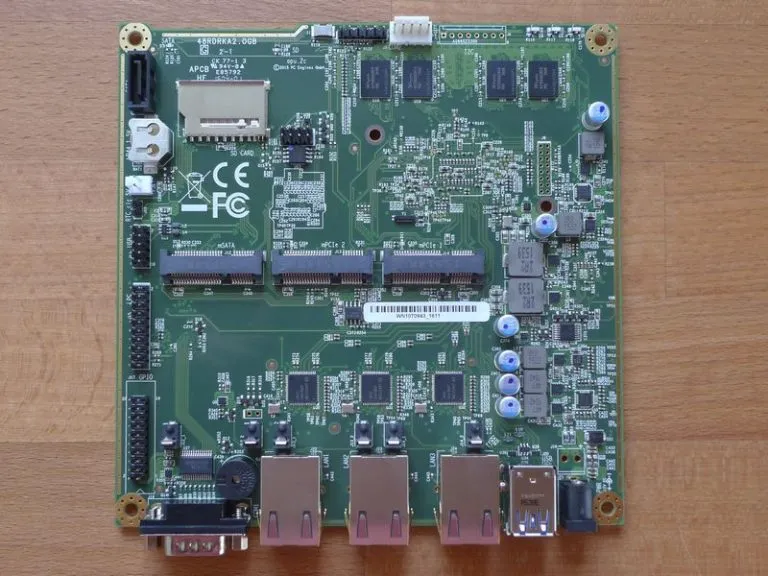
This will describe how I installed pfSense on a APU2C4. The culprit in my case is that I use OSX (10.11, El Capitan), so the creation of the boot USB stick and the serial console access is a bit different than for Linux and Windows.
- PC Engines APU2C4 -> http://www.pcengines.ch/apu2c4.htm
- 16GB, msata16d
- OSX 10.11 (El Capitan)
- My serial port is /dev/tty.UC-232AC (Aten UC232A USB Serial Konverter Kabel, Roline Nullmodem-Kabel, BU-BU)
Steps:
- Download
- Create the USB key (Windows and OSX) with TinyCore (http://www.pcengines.ch/tinycore.htm)
- Boot from the USB stick with Serial console access
- Write pfSense image to your boot media for the APU2C4
Recipe
- Format the USB key as FAT32, Master Boot Record, using Disk Utility
malu@kmg-mcp001.local $ diskutil list

...

Unencrypted /dev/disk2 (external, physical):
#: TYPE NAME SIZE IDENTIFIER
0: FDisk_partition_scheme *7.8 GB disk2
1: DOS_FAT_32 TINY 7.8 GB disk2s1

malu@kmg-mcp001.local $ disk=2

malu@kmg-mcp001.local:$ diskutil unmountdisk /dev/disk${disk}
Unmount of all volumes on disk2 was successful- Copy a boot sector to the USB stick as described here: http://www.pyrosoft.co.uk/blog/2013/01/09/creating-a-bootable-usb-stick-from-osx/
 mkdir mbr
 cd mbr
 curl -L -O http://www.kernel.org/pub/linux/utils/boot/syslinux/syslinux-5.00.zip
 unzip syslinux-5.00.zip 'mbr/mbr.bin'

diskutil unmountdisk /dev/disk${disk}

sudo dd conv=notrunc bs=440 count=1 if=mbr/mbr.bin of=/dev/disk${disk}- Make the USB disk bootable (my USB disk is /dev/disk2, you must find your own through "diskutil list") (print, f 1, write, print, exit)
malu@kmg-mcp001.local $ diskutil unmountdisk /dev/disk${disk}
malu@kmg-mcp001.local $ sudo fdisk -e /dev/disk${disk}

 fdisk: could not open MBR file /usr/standalone/i386/boot0: No such file or directory
 Enter 'help' for information

fdisk: 1> print

Disk: /dev/disk2 geometry: 949/255/63 [15248832 sectors]
 Offset: 0 Signature: 0xAA55
 Starting Ending
 #: id cyl hd sec - cyl hd sec [ start - size]
 ------------------------------------------------------------------------
 1: 0B 1023 254 63 - 1023 254 63 [ 2 - 15248830] Win95 FAT-32
 2: 00 0 0 0 - 0 0 0 [ 0 - 0] unused
 3: 00 0 0 0 - 0 0 0 [ 0 - 0] unused
 4: 00 0 0 0 - 0 0 0 [ 0 - 0] unused

fdisk: 1> f   1

Partition 1 marked active.

fdisk:*1> write

Writing MBR at offset 0.

fdisk: 1> print

Disk: /dev/disk2 geometry: 949/255/63 [15248832 sectors]
 Offset: 0 Signature: 0xAA55
 Starting Ending
 #: id cyl hd sec - cyl hd sec [ start - size]
 ------------------------------------------------------------------------
 *1: 0B 1023 254 63 - 1023 254 63 [ 2 - 15248830] Win95 FAT-32
 2: 00 0 0 0 - 0 0 0 [ 0 - 0] unused
 3: 00 0 0 0 - 0 0 0 [ 0 - 0] unused
 4: 00 0 0 0 - 0 0 0 [ 0 - 0] unused

fdisk: 1> exit- Download a TinyCore iso image (any image will do)
wget http://distro.ibiblio.org/tinycorelinux/4.x/x86/release/TinyCore-4.7.7.iso- Use Unetbootin to write this image to your USB stick, which will result in this:
malu@kmg-mcp001.local:/Volumes/TINY $ls -la
 total 15592
 drwxrwxrwx@ 1 malu staff 4096 Sep 6 10:57 .
 drwxrwxrwt@ 6 root admin 204 Sep 6 10:57 ..
 drwxrwxrwx 1 malu staff 4096 Sep 6 10:55 .Spotlight-V100
 drwxrwxrwx@ 1 malu staff 4096 Sep 6 10:55 .Trashes
 -rwxrwxrwx 1 malu staff 4096 Sep 6 10:55 ._.Trashes
 drwxrwxrwx 1 malu staff 4096 Sep 6 10:57 .fseventsd
 drwxrwxrwx 1 malu staff 4096 Sep 6 10:57 boot
 drwxrwxrwx 1 malu staff 4096 Sep 6 10:57 cde
 -rwxrwxrwx 1 malu staff 60928 Sep 6 10:57 menu.c32
 -rwxrwxrwx 1 malu staff 684 Sep 6 10:57 syslinux.cfg
 -rwxrwxrwx 1 malu staff 612 Sep 6 10:57 ubnfilel.txt
 -rwxrwxrwx 1 malu staff 5385191 May 10 2013 ubninit
 -rwxrwxrwx 1 malu staff 2491968 May 10 2013 ubnkern
-rwxrwxrwx 1 malu staff 36 Sep 6 10:57 ubnpathl.txt- Download pfSense media
#--- pre 2.4 - nanobsd
wget https://nyifiles.pfsense.org/mirror/downloads/pfSense-CE-2.3.4-RELEASE-4g-amd64-nanobsd.img.gz

##--- 2.4+ - nanobsd is no longer supported by pfSense
#wget https://nyifiles.pfsense.org/mirror/downloads/pfSense-CE-2.4.2-RELEASE-amd64.iso.gz- Copy TinyCore files from PCEngines over to the USB stick
mkdir -p /temp/pcengines
cd /temp/pcengines
wget http://www.pcengines.ch/file/apu_tinycore.tar.bz2
cd /Volumes/TINY
tar xvzf /temp/pcengines/apu_tinycore.tar.bz2- Copy the pfSense image to the USB stick
cp /temp/pfSense/pfSense-CE-2.4.2-RELEASE-amd64.iso.gz .
cd
diskutil unmountdisk /dev/disk${disk}- Start up the serial terminal.
screen /dev/tty.UC-232AC 115200 8N1- When you connect the power, you should more or less immediately (within a couple of seconds) see the following:
PCEngines apu2
 coreboot build 20160307
 ...
 PCengines Press F10 key now for boot menu:

Press <F10> to get the boot menu:

Select boot device:

1. USB MSC Drive JetFlash Transcend 16GB 1.00
2. ata0-0: SATA SSD ATA-10 Hard-Disk (15272 MiBytes)
3. Payload [memtest]
4. Payload [setup]- Choose <1> for your USB key.
gzip -dc pfSense-CE-2.3.2-RELEASE-4g-amd64-nanobsd.img.gz | pv | dd of=/dev/sda bs=10M- Unplug the USB key, power cycle, and you are done!
References:
- https://unetbootin.github.io/
- http://www.pcengines.ch/newshop.php?c=48881
- http://www.pcengines.ch/pdf/apu2.pdf
- http://www.pyrosoft.co.uk/blog/2013/01/09/creating-a-bootable-usb-stick-from-osx/
- https://forum.pfsense.org/index.php?topic=106444.0
- Driver for the UC232-A USB to serial converter (i.e for Sierra/High Sierra): http://www.aten.com/global/en/products/release-note//?action=release_note&type=driver&eid=412
Blog